
Your number can mean anything - damage, seconds, or health.
By now your enemies live in one Enemies collection, every one a game object with the same fields. The fields hold values - Health = 60, Speed = 30, Damage = 8. We have made a breakthrough, but there is a catch in these figures.
Look at the simple value of `10'. What's it? It can be damage, it can be the duration in seconds, or it can be the amount of health, or just the flag that you wanted to make "true", but entered as text. By itself, the "ten" in the input field is a pure mystery: it is impossible to understand its true meaning from it.
The trouble starts when the numbers need to be understood or verified. A designer reads MaxHealth = 10 and has to assume it means health and not something else. A balance table that sorts values doesn't know whether 10 is a whole number or a decimal. An engine that loads the JSON has to guess whether the field is a string, a number, or a boolean. When nothing has a type, the meaning of every value stays in someone's head - and that's exactly how design and code start to drift.
The fix is to give every field a type. A typed field carries its own meaning: "this is a number", "this is text", "this is a true/false switch".
Why typed fields
A field type tells the editor, the balance table, and the engine how to treat the value. In IMS Creators, the field types you'll reach for most often are:
- String - a single line of text, like a name.
- Text - a longer, multi-line text, and you can format it.
- Number - a value with decimals (float), like
8.5. - Integer number - a whole number, like
60. - Checkbox - a true/false (boolean) switch.
The point of a type isn't ceremony. Each type changes the behavior of the game engine:
- String and Text hold words, not numbers - so a name field can't accidentally store a calculation.
- Number and Integer number hold math-able values - they can be sorted, compared, and balanced as numbers, not as text.
- Number (float) keeps decimals, while Integer number restricts values to whole numbers - so a health value like
60stays a clean integer, and a damage value like8.5is allowed. - Checkbox is strict about being
trueorfalse- no spelling it as text, no ambiguity.
Add typed fields to an enemy
Let's apply this to one of the enemies in the collection. To set a field's type: in the Properties block, open the field's menu (the three vertical dots in the field's cell), choose Change settings, and pick its Type. IMS Creators offers String, Text, Number, Integer number, Checkbox, and more, so you can model exactly what the field needs.
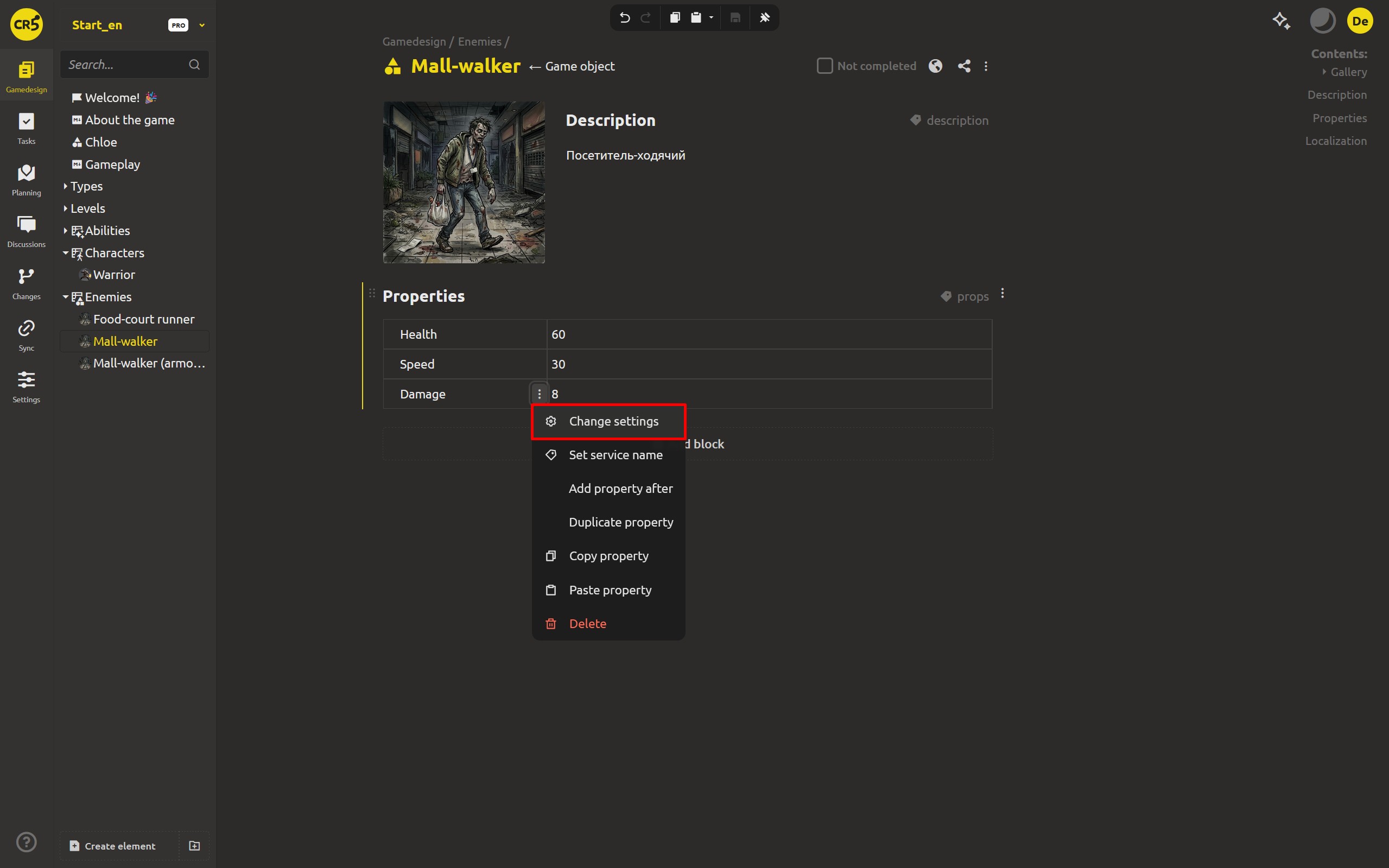
That's it. Now each value has its own meaning and property. MaxHealth is a whole number, Damage is a decimal, IsBoss is a true/false switch.
The payoff: values are understood and verified
Typing the fields changes what you can do with the data.
- The editor validates values. Because a field knows its type, what you can enter is checked as you go. A whole-number field won't quietly accept "abc", and a checkbox stays a clean true/false instead of drifting into text. Mistakes surface at the point of entry, where they're cheap to fix.
- The balance table interprets the numbers. When values are typed and comparable, sorting and comparing "MaxHealth" or "Damage" works on real numbers - the table knows
10is a number, not a string, and how to order it. - The engine knows what each number means. When you later load an element's JSON in the engine, a typed field carries its meaning - a float, an integer, a boolean.
This is the same structure that you have been building all this time, but at a deeper level: fields have gone from prose to structured values - and now from raw values to values with a declared type. Your ideas become organized data that your colleague, the game engine, and the AI assistant will understand.
Next up: base objects
Next step: define the type once, spawn it many times. Instead of every enemy redeclaring the same fields over and over, a base object will define what every enemy has, and each concrete enemy will just fill in the values. You'll type the structure once and reuse it everywhere.
Ready to give your stats real types? Download IMS Creators, open ims.cr5.space/desktop, open an enemy in your project, and set a type on each field - a String name, a Text description, a Number damage, an Integer max health, and a Checkbox for "is boss". Two minutes of typing is what makes your numbers mean something.
FAQ
Why does the type of a field matter?
A type tells the editor, the balance table, and the engine what the value really is - a number, text, or a true/false switch. Without a type, a bare value like 10 could be damage, seconds, or health, and nothing can verify or meaningfully use it.
What field types are available?
The common ones are String (a single line of text), Text (multi-line, formattable), Number (a decimal value), Integer number (a whole number), and Checkbox (true/false). IMS Creators also offers richer field types, which the series covers later.
What's the difference between Number and Integer number?
Number stores values with a decimal part, like 8.5. Integer number restricts the value to whole numbers, like 60. Choose based on what the field should hold - damage might be a decimal, health is usually a whole number.
Is a Checkbox the same as saying "boolean" in code?
Yes. The store a true/false value - a boolean. In the interface it's presented as a checkbox, but the data it holds is a true/false (boolean) value, which an engine reads directly.
How do I set a field's type?
Open the Properties block, click the three vertical dots in the field's cell to open its menu, choose Change settings, and pick the Type. You can change it later if needed.
Can typed fields prevent bad entries?
Yes, up to a point. Because the editor knows the field's type, it validates values as you enter them - a whole-number field won't quietly accept text, and a checkbox stays a clean true/false. This surfaces mistakes early, where they're cheap to fix.
Do typed fields change what the engine loads?
Yes. A typed field carries its meaning in the data - a float, an integer, or a boolean - so when the engine loads an element's JSON, it knows how to interpret each value instead of guessing.