
This tutorial is a part of the Getting started series — Day 1, Week 2.
The problem: a value with no type has no behavior
By now your enemies live in one Enemies collection, every one a game object with the same fields. The fields hold values - Health = 60, Speed = 30, Damage = 8, Size = 1. That's a huge step. But there's a catch hiding in those numbers.
The semantics of a value come from its field name, not its type. Damage = 8 is clearly damage, Health = 60 is clearly health - a 10 doesn't stop meaning what its field says it means. What nothing tells you is how the value behaves: what you're allowed to store in it, and what you can do with it.
Without a type, every field is just free text, and none of the basic questions can be answered:
- Can I sort or compare it? A text field sorts
"10","8","60"as words, not numbers - so"10"lands before"8"and your balance table orders the values wrong. - Is this value even valid? A health of
abcslips in as text, a boolean gets spelled inconsistently (True,true,yes), and a whole number quietly accepts8.5. Nothing catches the mistake where you type it. - Will the engine trust it? In code, a float, an integer, and a boolean behave completely differently. If the type is unknowable, the engine has to guess - and guessing is exactly how design and code start to drift.
The fix is to give every field a type. A typed field doesn't change what the value means - it was always damage or health. The type adds behavior: the value can be validated, sorted, compared, and handed to the engine as precisely the kind of thing the engine expects. The 10 stays a 10; the type decides everything you're allowed to do with it.
Why typed fields
A field type tells the editor, the balance table, and the engine how to treat the value. In IMS Creators, the field types you'll reach for most often are:
- String - a single line of text, like a name.
- Text - a longer, multi-line text, and you can format it.
- Number - a value with decimals (float), like
8.5. - Integer number - a whole number, like
60. - Checkbox - a true/false (boolean) switch.
The point of a type isn't ceremony. Each type changes how the field behaves:
- String and Text hold words, not numbers - so a name field can't accidentally store a calculation.
- Number and Integer number hold math-able values - they can be sorted, compared, and balanced as numbers, not as text.
- Number (float) keeps decimals, while Integer number restricts values to whole numbers - so a health value like
60stays a clean integer, and a damage value like8.5is allowed. - Checkbox is strict about being
trueorfalse- no spelling it as text, no ambiguity.
When a field has a type, its behavior is explicit - what's a valid value, and how the rest of the pipeline can use it - instead of something the engine has to guess.
Add typed fields to an enemy
Let's apply this to one of the enemies in the collection. It's the same flow you already used for game objects: open the Properties block, and each field has its own type setting.
For this enemy - the same one from last week's bestiary - give the properties real types:
- Name - a String field. It holds the enemy's name as a single line of text.
- Description - a Text field. A longer, multi-line description you can format.
- Health - an Integer number field. It stores a whole number of hit points - Mall-walker's
60stays a clean integer. - Speed - a Number field. Movement speed can be fractional, so a decimal value is allowed.
- Damage - a Number field. A decimal value is allowed here, because damage can be a fractional amount.
- Size - a Number field. Enemies can be smaller than one unit - the armored Mall-walker's
Size = 1.5only fits a decimal field.
To set a field's type: in the Properties block, open the field's menu (the three vertical dots in the field's cell), choose Change settings, and pick its Type. IMS Creators offers String, Text, Number, Integer number, Checkbox, and more, so you can model exactly what the field needs.
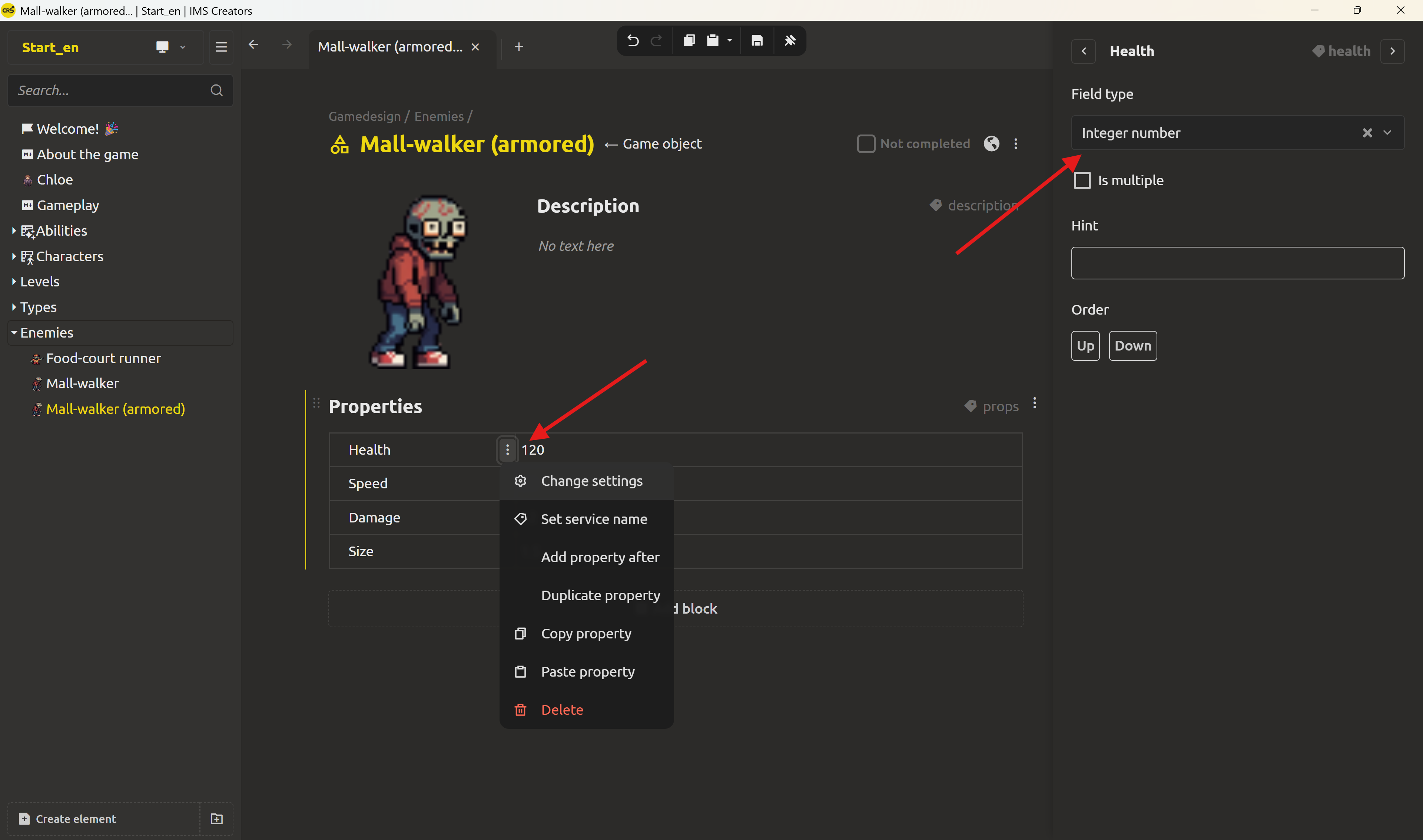
That's it. Each value now knows what it is. Health is a whole number, Damage and Size are decimals - nothing left to guess.
A designer writes "x2" and "+100" - a Number field refuses both
A designer thinks in effects: one ability makes an enemy take double damage, another deals a flat +100 extra. They don't type 2 and 100 - they reach for x2 and +100, because that's how the effect reads in their head.
Now the type starts earning its keep. A Number field won't take x2. The editor simply refuses: "that's not a number". And that refusal is the point - it has to happen now, not later. It forces the designer to decide what x2 actually was: a multiplier, an addition, a percentage - before it becomes a row in a balance table or a JSON field the engine loads.
Put both effects in a single Damage text field and the decision is postponed: x2 and 100 both fit, and nothing complains. Meanwhile the programmer, who has only ever seen values like 100 in that field, writes logic that adds the value to the damage. The moment someone logs a x2 ability, that assumption breaks the system. A Number type catches this far earlier - it simply refuses x2 at the moment of typing, when fixing it costs nothing, instead of shipping a wrong assumption that breaks the game later.
That's why designing the structure is part of the job, not paperwork. To give the engine unambiguous logic, one field isn't enough: either separate the operations into their own typed fields - DamageMultiplier (Number) and DamageBonus (Number) - or add a field that names the operation, like an EffectType enum with Multiply and Add. Now x2 is representable: the multiplier field holds 2, and the structure says it's a multiplier.
This is what "designing the system" actually means. Writing x2 was easy; making that x2 implementable - as a multiplier, in a field the engine can read - is design. The structure you choose in the editor becomes the logic a programmer can write against, without a rewrite and without a guess.
The payoff: values are understood and verified
Typing the fields changes what you can do with the data.
- The editor validates values. Because a field knows its type, what you can enter is checked as you go. A whole-number field won't quietly accept "abc", and a checkbox stays a clean true/false instead of drifting into text. Mistakes surface at the point of entry, where they're cheap to fix.
- The balance table interprets the numbers. When values are typed and comparable, sorting and comparing "Health" or "Damage" works on real numbers - the table knows
10is a number, not a string, and how to order it. - The engine knows what each value is. When you later load an element's JSON in the engine, a typed field carries its type - a float, an integer, a boolean. The engine no longer has to guess whether a value is text, a number, or a flag, or decide how to treat it in code.
This is the same structure you've been building all along, one level deeper: fields went from prose to structured values - and now from raw values to values with declared types. The behavior of your data becomes part of the file itself instead of living in guessed conventions.
Next up: base objects
Today the enemy's fields carry real types, so every value behaves predictably and can be checked.
Tomorrow we take the next step: define the type once, spawn it many times. Instead of every enemy redeclaring the same fields over and over, a base object will define what every enemy has, and each concrete enemy will just fill in the values. You'll type the structure once and reuse it everywhere.
Ready to give your stats real types? Download IMS Creators, open ims.cr5.space/desktop, open an enemy in your project, and set a type on each field - a String name, a Text description, an Integer health, and Numbers for speed, damage, and size. Two minutes of typing is what makes your numbers mean something.
Ready? Define the type once, spawn it many times - the next post in this series.
FAQ
Why does the type of a field matter?
A type tells the editor, the balance table, and the engine how the value behaves - whether it's a number that can be sorted and summed, a string of words, or a true/false switch. The meaning ("this is damage") already comes from the field name; the type decides what you're allowed to store and how the pipeline may use it. Without a type, nothing can validate, compare, or trust the value.
What field types are available?
The common ones are String (a single line of text), Text (multi-line, formattable), Number (a decimal value), Integer number (a whole number), and Checkbox (true/false). IMS Creators also offers richer field types, which the series covers later.
Should a "x2" and a "+100" ability share one field?
No. A Number field won't even let you type x2 - the editor refuses, forcing you to decide then and there whether the effect is a multiplier or a flat bonus. That refusal is the early warning. Squeeze both effects into one untyped field instead, and the problem only shows up later - when a x2 ability reaches a programmer who only implemented additions. Keep the operations separate: DamageMultiplier and DamageBonus fields, or an EffectType enum with Multiply / Add.
What's the difference between Number and Integer number?
Number stores values with a decimal part, like 8.5. Integer number restricts the value to whole numbers, like 60. Choose based on what the field should hold - damage might be a decimal, health is usually a whole number.
Is a Checkbox the same as saying "boolean" in code?
Yes. The store a true/false value - a boolean. In the interface it's presented as a checkbox, but the data it holds is a true/false (boolean) value, which an engine reads directly.
How do I set a field's type?
Open the Properties block, click the three vertical dots in the field's cell to open its menu, choose Change settings, and pick the Type. You can change it later if needed.
Can typed fields prevent bad entries?
Yes, up to a point. Because the editor knows the field's type, it validates values as you enter them - a whole-number field won't quietly accept text, and a checkbox stays a clean true/false. This surfaces mistakes early, where they're cheap to fix.
Do typed fields change what the engine loads?
Yes. A typed field carries its meaning in the data - a float, an integer, or a boolean - so when the engine loads an element's JSON, it knows how to interpret each value instead of guessing.