
This tutorial is a part of the Getting started series — Day 4, Week 2.
The problem: free-text fields quietly disagree
By now everything is laid out on the shelves: health, speed and damage are counted as typed numbers, new characters and cards appear from forms built on a base object, and renaming never breaks a link. Long live structure!
But one kind of field still behaves like a sticky note: anything you type by hand.
Take the Role field on Chloe from Week 1. It holds Protector - but that's only as true as the last typo. Someone writes protector, another person notes Protector (LEAD), and for the balance table and the engine those are three different values that will never match. The value was always meant to come from a small closed set - the field just never said so.
The same uncertainty hits structured data. Each enemy's loot table is a row of what drops and how likely. Describe that in free text and everyone decides in their own way: one writes Fire Extinguisher 30%, another extinguisher / common, a third invents a new format. Same data, three shapes, nothing comparable.
How to fix it? Stop describing these things in arbitrary text and define them once as real types: structures, which assemble several related fields into one reusable form, and enumerations, which limit a field to a fixed set of acceptable values. Used together they give you something neither alone can: a loot table that's both well-typed and repeatable, and a role vocabulary that won't "drift" from one spelling to another.
What a structure and an enum are
A Structure is a reusable form that collects several fields with properties into one unit. Define it once, and any element can use it as a field type - the editor displays it as a nested form, and the value is saved as a single structured object.
An Enumeration is a fixed list of acceptable values. Instead of arbitrary text, the field accepts only the values you have defined, each with a stable service name under the hood. When you select a value, the exact key is stored in the data, so the engine and the balance tables always see the same consistent row.
Create a Loot Table Row structure
Remember the loot table from a minute ago - "what drops and how likely" in five different hand-typed formats. Let's give that row a real shape so every enemy ends up with it filled in the same way.
Structures are created as ordinary elements. Click Create element, Other, choose Structure as the type, and name it Loot Table Row. It opens in a dedicated structure editor.
Click Add field to define the shape of one loot drop. Each field has a title, a type, and a service name. Give it the two fields that every drop shares:
- Card — Type: Element selector (the dropped card — a link to a Game Card, so items and ability cards both work)
- Drop chance — Type: Number (how likely it is to drop,
0.3for 30%)
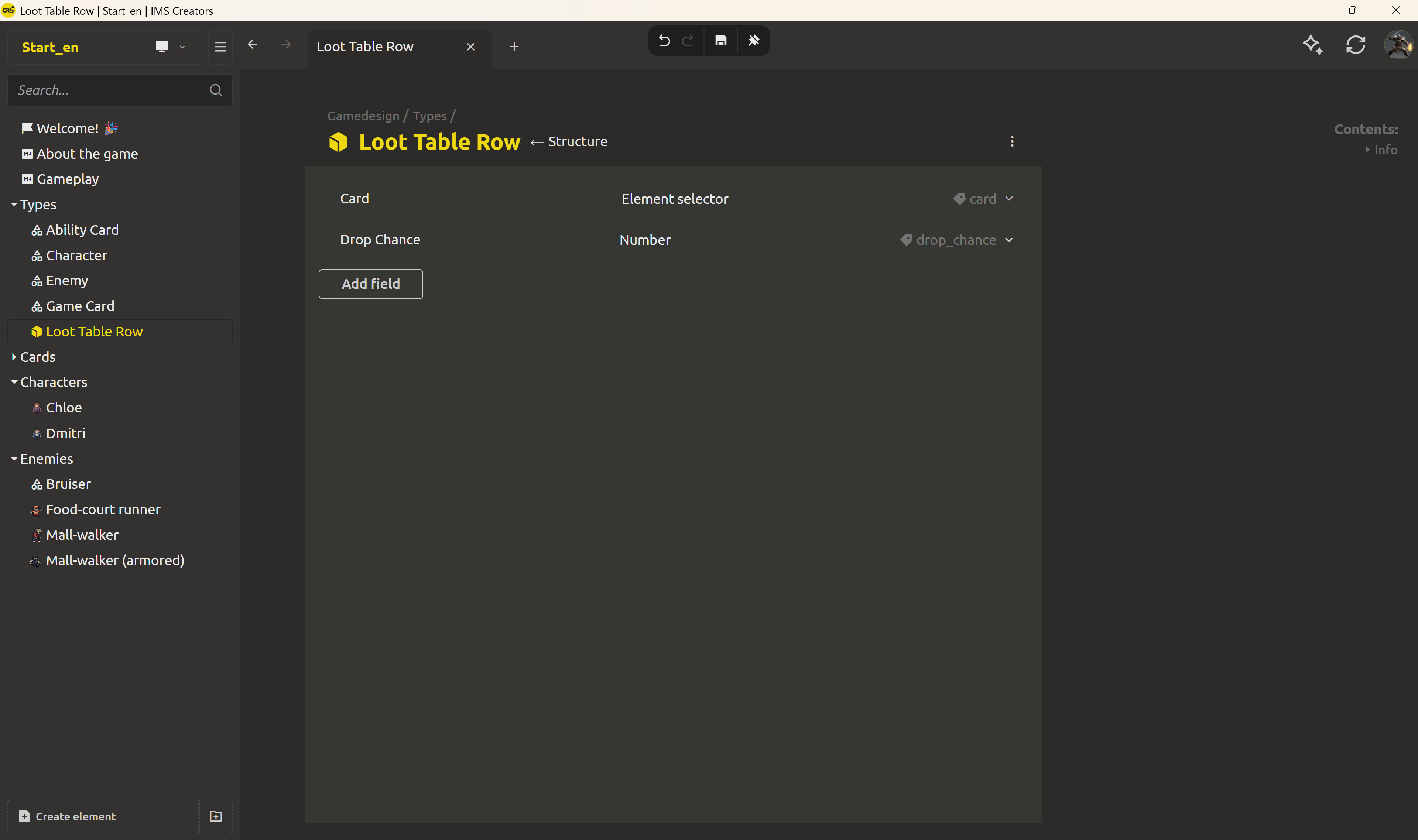
Now "what does this enemy drop" isn't a loose sentence — it's a known shape with trusted fields: a linked card and a chance.
The enemy's loot table is a list of those rows
Go to the base Enemy object, open the Properties block, and add a field:
- Loot table — Type: Structure → choose
Loot Table Rowin the parameters
A single row is one drop. But an enemy drops several cards — it needs an array of rows. This is easy to fix: simply check the Is Multiple box in the field settings. That one checkbox turns a single value into an array — the field is no longer "one loot row" but a whole list of them.
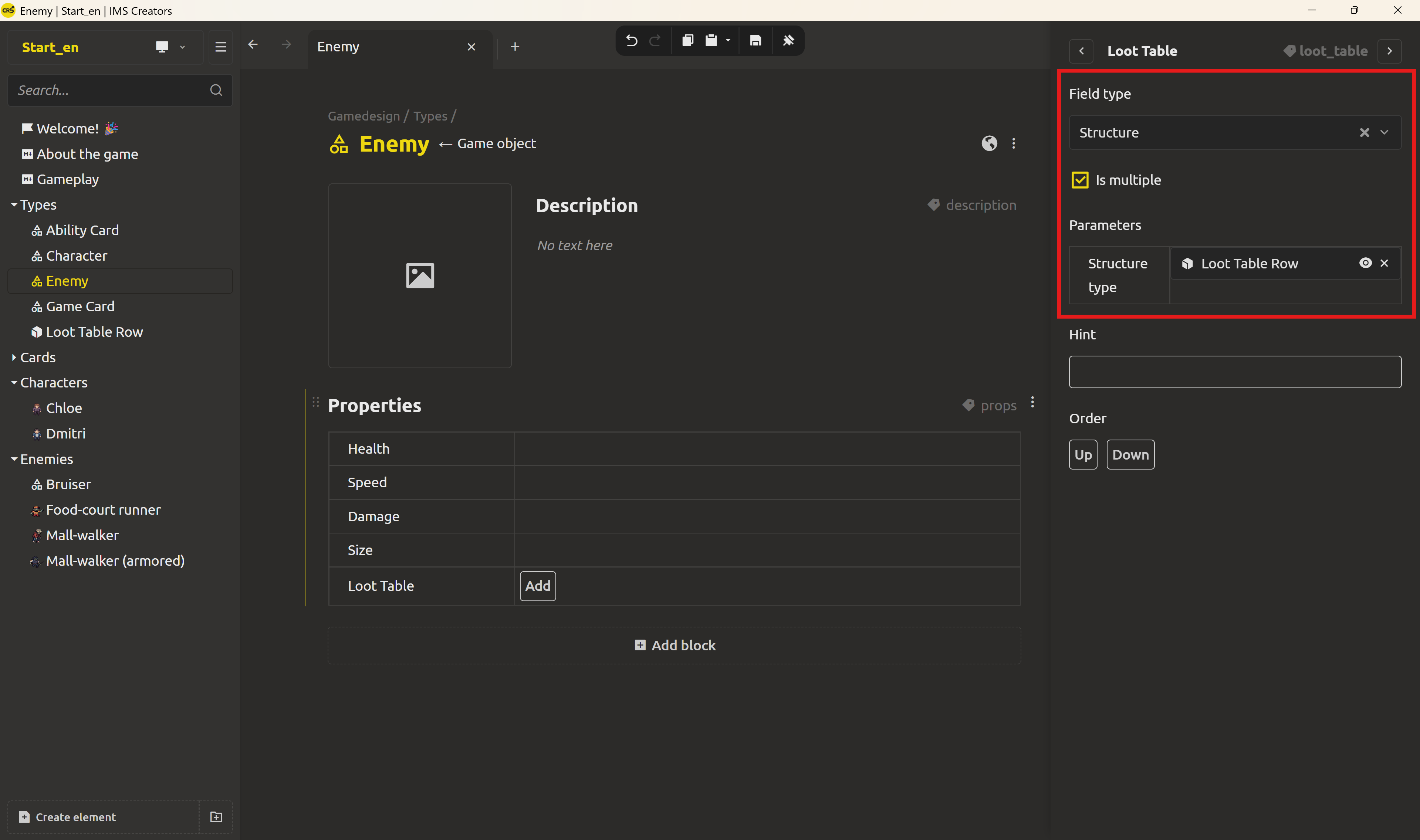
Now every enemy instance keeps a list of loot rows: add a row, pick the card with the element selector, type the drop chance. One Mall walker might drop Fire Extinguisher 0.3 and Banana Peel 0.7; a boss drops a dozen rows.
Is multiple isn't special to structures - it works for any field: a list of strings, a list of links, a list of numbers. It's the general "this field holds a collection" switch
Create a Character Role enum
Now the vocabulary. Click Create element, Other, choose Enumeration as the type, and name it Character Role. A dedicated enum editor opens with an empty value list.
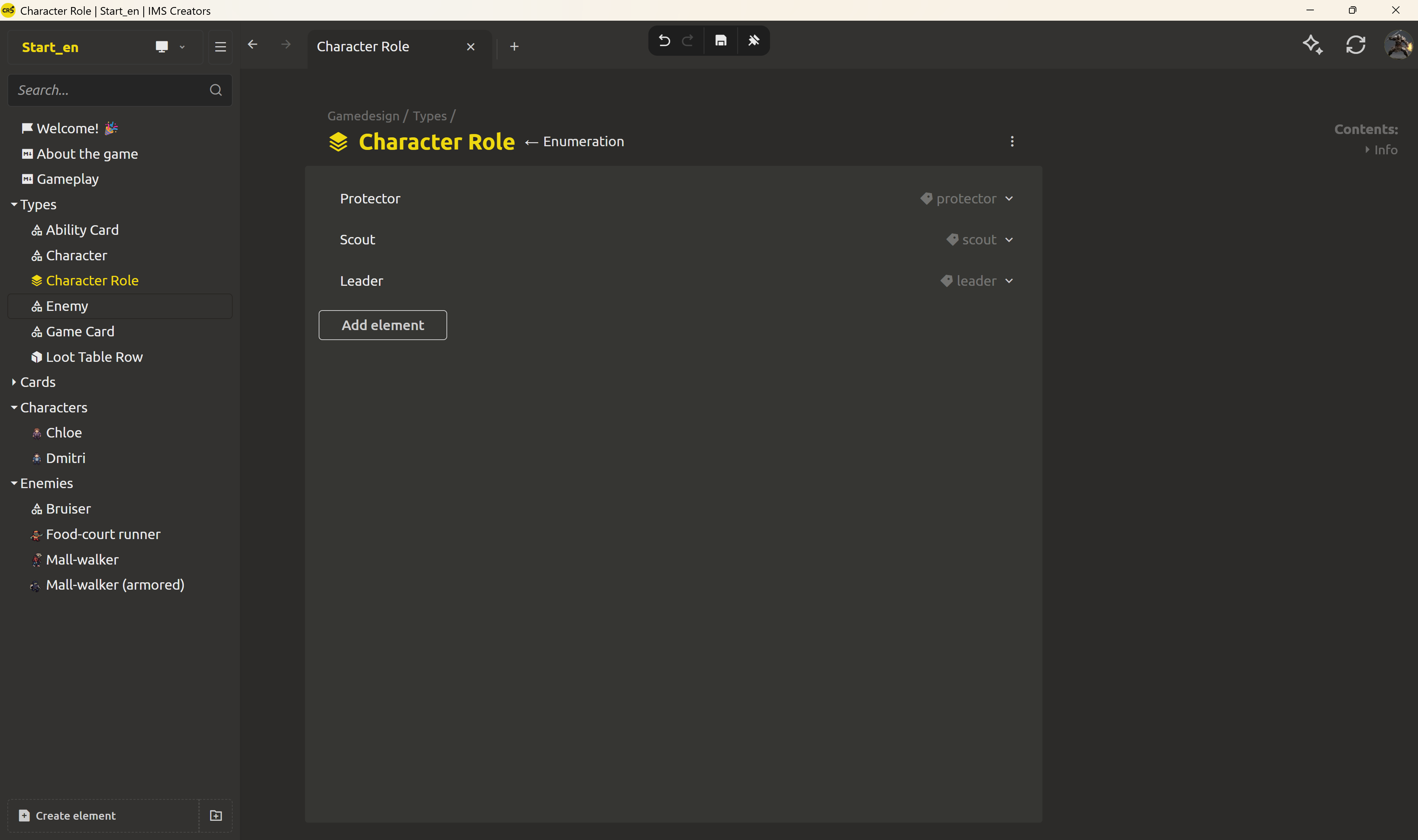
Click Add element to add each allowed role:
ProtectorScoutLeader
Each entry has a title (what you see) and a service name (the stable key stored in data — shown in the tag). The editor rejects duplicate service names, so you simply cannot create Protector and protector as separate entries; there is exactly one Protector, and every element that uses this enum selects the same value.
Use the enum as a prop type
Setting a field's type to Enumeration is what puts it to work. On the base Character object, find the Role field you left as a String in Week 1. Change its type to Enumeration, and choose Character Role in the parameters.
Now Chloe's Role is a dropdown: Protector, Scout, Leader — she picks Protector, and the stored value is exactly the Protector key, not a guess. An enum offers two display modes in the field's settings: dropdown (default) or radio buttons for short vocabularies. There's also a checkbox that controls whether the field can stay empty — so you can make a role mandatory, or leave it optional. The structure you added to the Enemy base a moment ago works the same way: each enemy's Loot table is an editable list of Card-link + Drop chance pairs, identical in shape across the whole roster.
The payoff: the data is trustworthy
A single way of input is the whole point. A game designer can no longer invent a typo'd role, and the engine can rely on the vocabulary staying one thing - a Protector is a Protector everywhere. Loot tables stop being paragraphs that each enemy formats differently and become structures that can be read, summed, and exported programmatically.
Tomorrow the links and the structure meet: with every ability card carrying its Owner, and every enemy carrying a loot table that links to cards, the design becomes a graph you can ask questions of - "which abilities does this character have?" and "who drops this card?" become queries, not archaeology.
FAQ
What is a Structure in a game design document?
A Structure is a reusable shape that bundles several property fields into one unit. Define it once and use it as a field type on multiple elements; each element then fills in a nested form built from the structure's fields.
How do I make a field hold a list of values?
Open the field's menu in the Properties block, choose Change settings, and check Is multiple. That turns a single value into an array — you can then add as many rows as you need. It works for any field type, not just structures.
What is an Enumeration (enum) in a game design document?
An Enumeration is a fixed list of allowed values for a field. Instead of free text, the field accepts only the values you defined, each with a stable service name, so the vocabulary stays consistent everywhere it's used.
How do I create a Structure or Enumeration in IMS Creators?
Click Create element, choose Other, pick Structure or Enumeration, and name it. Each opens a dedicated editor: add fields with Add field (title, type, service name) for structures, or allowed values with Add element for enums. Duplicate service names are rejected.
How do I use a structure or enum as a field type?
When editing a property's type, choose Structure or Enumeration, then pick the specific definition in the parameters. The element then edits that field as a controlled input — a nested form for a structure, a dropdown for an enum.
Why are the role's values stored as keys and not as text?
Because free text drifts: Protector, protector, and PROTECTOR (lead) are different values to a machine. The enum captures the vocabulary in a consistent set with stable service names, so a role always means exactly one thing to the engine and the balance tables.