
This tutorial is a part of the Getting started series — Day 3, Week 2.
The problem: a renamed character leaves stale traces
Yesterday the categories got their templates: bases for Enemy, Character, and — the new piece — Game Card, with the first cards spawned as instances.
Today the morning scare: Dmitri, the character you created yesterday, is a name you already want to change — he's pivoted to a different role. You rename him. Easy - one edit in the project tree.
But what if his name was typed by hand a dozen times? In the description of his signature ability, in the notes about who gets that card, in that scratch list of the deck. None of those places update when you rename, because each one stores the name as a static string. One little edit, and you have an orphaned doc and a stale deck; the bigger the project, the more broken traces a single rename leaves behind.
The fix isn't a better memory. It's the same approach you used for structure: stop storing names, store links.
Cards are of two kinds: item or ability
Before the link, one design fact matters. Your game cards aren't all alike:
- Item card - can be used by any character. The Fire Extinguisher, the Banana Peel - playable no matter who holds them.
- Ability card - belongs to one concrete character. Only Dmitri fires his signature ability, so that card is his.
That "belongs to" is a relationship between two elements. Today we make it a first-class thing in the design - and we do it on the card itself.
Multilevel inheritance: Game Card → Ability Card
Yesterday the base Game Card defined what every card has: Name, Cost, Damage, IsLegendary. The two kinds of cards are the same thing with one difference: ability cards have an owner, item cards don't.
That fits base objects perfectly - because a base object can itself be built on another base object. Mark a new base as an instance of Game Card, and it inherits the whole card schema. Then all we add is one field - Owner - to the already existing fields of the template:
- Name - String (inherited)
- Cost - Integer number (inherited)
- Damage - Number (inherited)
- IsLegendary - Checkbox (inherited)
- Owner - the one field we add
Name this base object Ability Card. Now the chain reads: Game Object → Game Card → Ability Card - each level inherits everything above it and adds what it needs. Items are instances of Game Card; abilities are instances of Ability Card.
Owner is a link, and it points at characters only
The Owner field is the heart of it. Set its type to Element selector - the field becomes a live link to another element, not a text value. And here's the nice part: an element selector can be scoped inside its settings. Set Owner's parameter to your Character base object, and the picker will only ever offer characters. You can't link an ability to a wall tile or a coin; the field type itself restricts who a card can belong to.
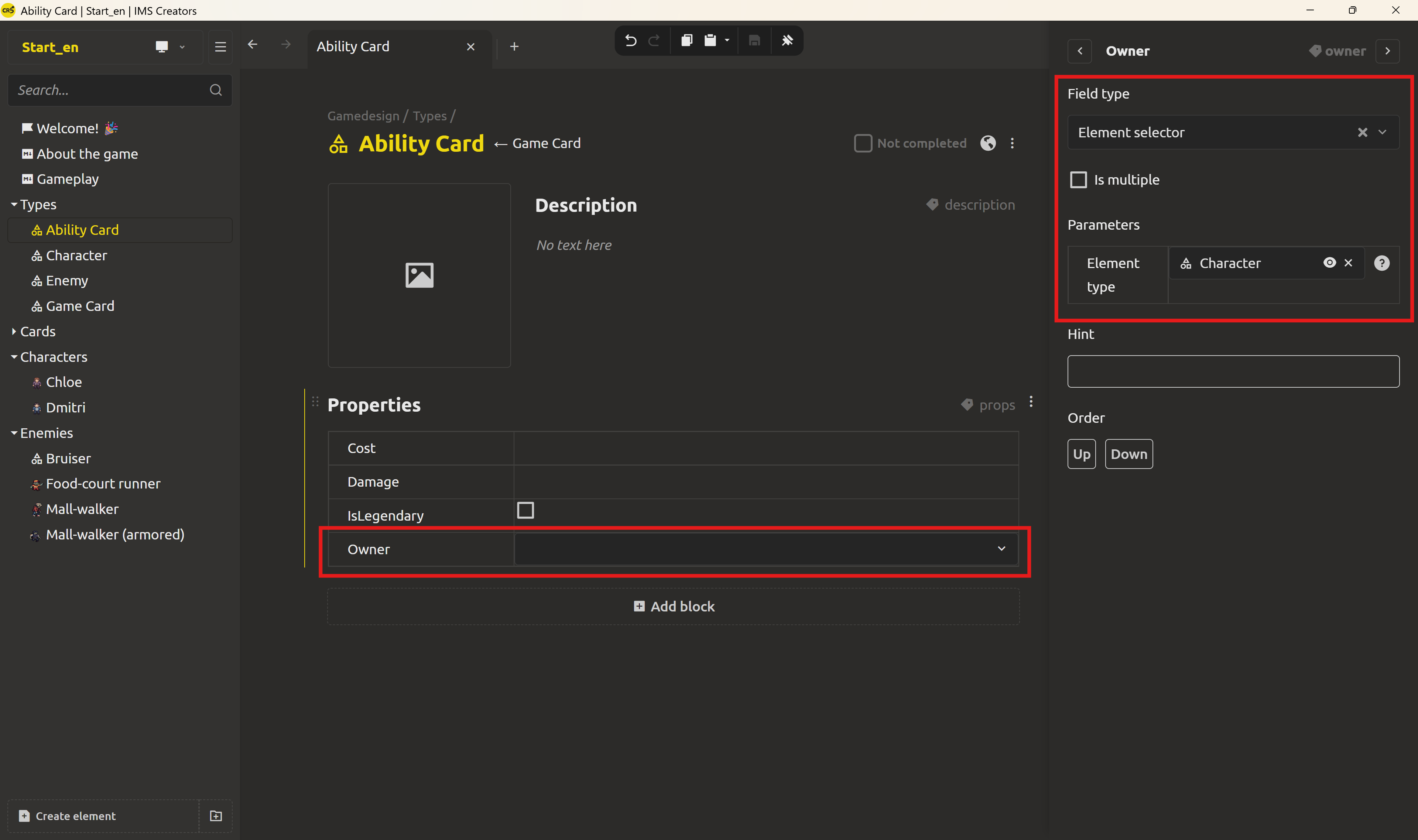
Every ability card spawned from this base now carries two things: the full inherited card schema, and an Owner that can only be a character.
The link lives once, on the card
Here's where the design stops duplicating. Dmitri's signature ability - Smoke Screen - is an instance of Ability Card. Open it and set its Owner to Dmitri. That's it: one link, stored exactly where the relationship belongs - on the card that belongs to him.
The connection has a clear direction: card → character. There's no second field to maintain on the character, no "which abilities does she have" list to keep in sync. The character doesn't need to know about the card - the card knows about the character.
Item cards, in the same twist, are instances of Game Card plain and simple - they never inherit the Owner field at all, since only Ability Card adds it. No owner means "usable by anyone". The distinction between the two kinds of cards is now data, not a convention written in a doc.
Rename-safe: the link follows the element
Now retry the morning's scare. Rename Dmitri to something else. The card holds a link to him, and the Owner link points at the element, not its title - so every place that shows the link updates instantly, and the card's Owner now reads the new name. No search, no fixing, no stale mentions. The rename stays one edit.
What's next: structures and enums
Links connect elements, and the card-to-character relationship is now real data. But the values inside your elements are still plain text - and a "Protector" that reads protector somewhere will quietly disagree with itself. Tomorrow: structures and enums - reusable forms for data like a card+chance pair on an enemy, and a fixed vocabulary for a character's Role.
Ready? Standardize enemy types with structures and enums - the next post in this series.
FAQ
What is an element reference in a game design document?
An element reference is a link from one design element to another that points to the target's stable ID rather than its name. When the target is renamed or edited, every link to it updates automatically, so the design stays consistent without manual fixing.
How do I link a character to her ability cards in IMS Creators?
You link once, on the card. An ability card carries an Owner field of type Element selector, scoped to the Character base object. Set Owner to the character, and the connection exists - there's no second field to maintain on the character side.
What is multilevel inheritance?
A base object built on another base object. The child inherits the parent's full field schema and adds its own fields. The chain Game Object → Game Card → Ability Card means ability cards inherit Name, Cost, Damage and IsLegendary from the card schema, then add Owner.
Why does the link live on the card and not on the character?
Because an ability belongs to exactly one character - the relationship reads naturally from the thing that's owned. Storing it once on the card removes the copy-pasted references that break on rename, and an empty Owner is the clean way to say "item - anyone can use it". To read the links the other way - which ability cards belong to a character - you'd use Show references and look at the back links; we'll cover that in a later post.
How do I make an element selector only show characters?
Set the field's type to Element selector, and in the field's parameters point the Type at your Character base object. The picker then restricts its choices to characters, so a link can't accidentally point at an unrelated element.
Will renaming an element break my links?
No. Links store the element's ID, not its name, so a rename updates every place that references the element automatically. The displayed titles are resolved live.