
This tutorial is a part of the Getting started series — Day 5, Week 4, Month 2.
The problem: what changed in the team's work during this cycle?
You can read new material every day and still not be able to explain briefly at the end of the month what you have achieved. Over that time the team created a project, moved the tasks onto a board, set up access rights and learned to work with metrics. But now a perfectly natural question arises - the one every manager asks sooner or later: when will the game actually be ready?
In month 1 we looked at where to keep the game design so that, instead of five scattered notes, the team got a single project. Over the second month that project turned into a full workspace that can be managed and that makes it easy to follow the progress of development.
The week in four steps
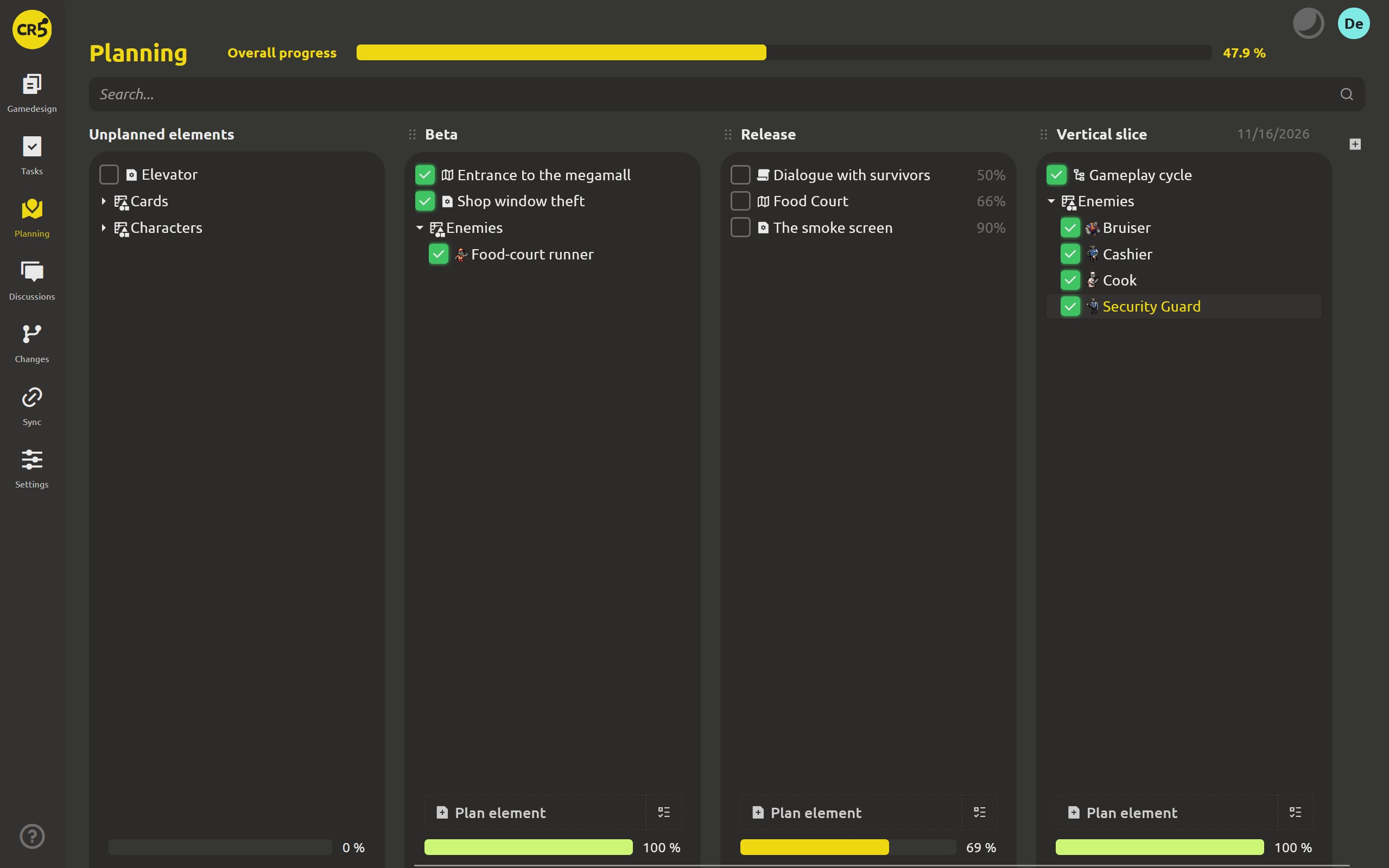
- Day 1 - the Planning section appeared in the project, with milestone columns and a separate Unplanned column. Progress is computed over the elements that have progress tracking enabled; templates are not counted.
- Day 2 - the columns got names and dates. Now milestones can be created right in the project instead of being kept in a separate spreadsheet. They are managed by an administrator, and each milestone gets a date by which the team plans to complete the corresponding stage.
- Day 3 - elements learned to show their own readiness. The percentage is computed from the checklist and does not reach 100% until every item is done. And marking the element as completed also closes the tasks attached to it.
- Day 4 - board tasks were linked to checklist items. Changing a task's status now shows up in the checklist, and the other way around, so the same progress no longer has to be updated by hand in two places.
The whole month, week by week
- Week 1 - one project and one work loop. The game design moved into the browser: we created a cloud project, looked at what it can do, invited the team with a single link and connected the desktop app folder. As a result, browser and desktop merged into one work process with no confusion about versions.
- Week 2 - every task got its place. The team moved the work onto a task board, assigned owners, watchers and deadlines, and instead of an endless task list set up a backlog, an archive and columns that fit. Two-week plans turned into sprints on a Gantt chart, and discussions and decisions are now stored next to the game design.
- Week 3 - clear roles and control over changes. We set up member roles and access rights down to an individual card. The change history helped us see who edited the data and when, while task estimates and time tracking became the basis for reports and metrics.
- Week 4 - planning became part of the workflow. We added the Planning section, set up milestones with dates, taught elements to compute their own readiness and linked the checklists to the tasks on the board.
The game design stopped being just a document; it became a full project that the team can discuss, control, measure and plan.
When is the game actually ready?
Open the Planning section - and the abstract question about readiness turns into concrete figures. For example, the Beta column shows 100%. This is not just a number from a report or the result of another meeting: behind it are checklists, tasks and project elements, each of which you can open and check.
If progress has stopped at 99%, just go to the relevant element to find out exactly what is missing: which checklist item has no tick, which linked task is not finished yet, and who is responsible for it.
This is the idea of "the month in one view": the date, the readiness percentage and the concrete work behind them are linked to each other and belong to one and the same project.
As a reminder, a 30-day free trial with no credit card required is available to explore the features. PRO adds tools for team work: role management and flexible access rights, change history, share by link, sync with the desktop app, 2 GB of storage per member, API and metrics.
What happens if the subscription ends?
Even after a subscription ends, your data stays where it is. The cloud workspace goes into read-only mode, so you can view the project and export everything you need. Meanwhile the desktop app keeps working for free and offline, and the files stay on your computer.
Nothing is deleted and nothing is locked: the project can still be read and exported from the cloud, while local work on the game design continues as before.
What's next: dialogues and scripts
Planning helps answer the question "when?". In the third month we move on to the next part of development - what is created directly inside the project: dialogues and scripts, the game's production layer itself.
FAQ
Which features of this month are available only in PRO?
The team tools live in the PRO cloud workspace: the task board, planning, roles and access rights, change history, file sharing and metrics. You can try PRO for 30 days without linking a card.
Can I use all these features in the free desktop app?
No, the features are split between the app and the cloud. The desktop is a local game design editor: it has elements, checklists and readiness tracking. The board, planning, roles and reports belong to the cloud part, since they are built for several people working together on one project.
What happens if the subscription ends?
The cloud workspace goes into read-only mode, so you can view the project and export the data. The desktop app keeps working with your local files. Data is not deleted and files are not locked.
What will be in the next cycle?
In the third month we move on to dialogues and scripts - the tools for working on the game's production layer.