
This tutorial is a part of the Getting started series — Day 2, Week 1.
The problem: you have the idea, but it's nowhere properly written
This is a continuation of a series of articles about creating a structured GDB in ims creators.
You know what the game is, you see it in your head. You even tell others about your idea and collect rave reviews. But when you sit down to write, an empty Google Doc opens, the fear of a "blank sheet" turns on, and that's how the idea remains a dead weight in your thoughts.
Or another situation: you wrote somewhere - in Notion, Obsidian, in your phone notes, in a notebook. But this is a stream of consciousness, not a structured document. When you come back to it in a week, you won't find the right idea among the paragraphs and won't be able to relate it to the rest of the project.
Working with Markdown files
The Markdown element in IMS Creators is:
- A structured block in the project. It's not just text - it's an element with its own ID, its place in the workspace, and links to other elements.
- A regular file that opens in any editor. Open it in any editor, in 5 years it will be just as readable. This is useful when you want to transfer content from other programs that use Markdown (for example, Obsidian). The element loads through the Text (.md) option, and inside you get a visual editor: you work with Markdown as simply as in any text processor - the toolbar handles the formatting, and you can peek at the raw Markdown behind it whenever you like.
The visual editor
The Text (.md) element opens in a visual editor: the toolbar handles formatting like in any text processor, so you don't need to type Markdown by hand - though the raw Markdown is always one click away.
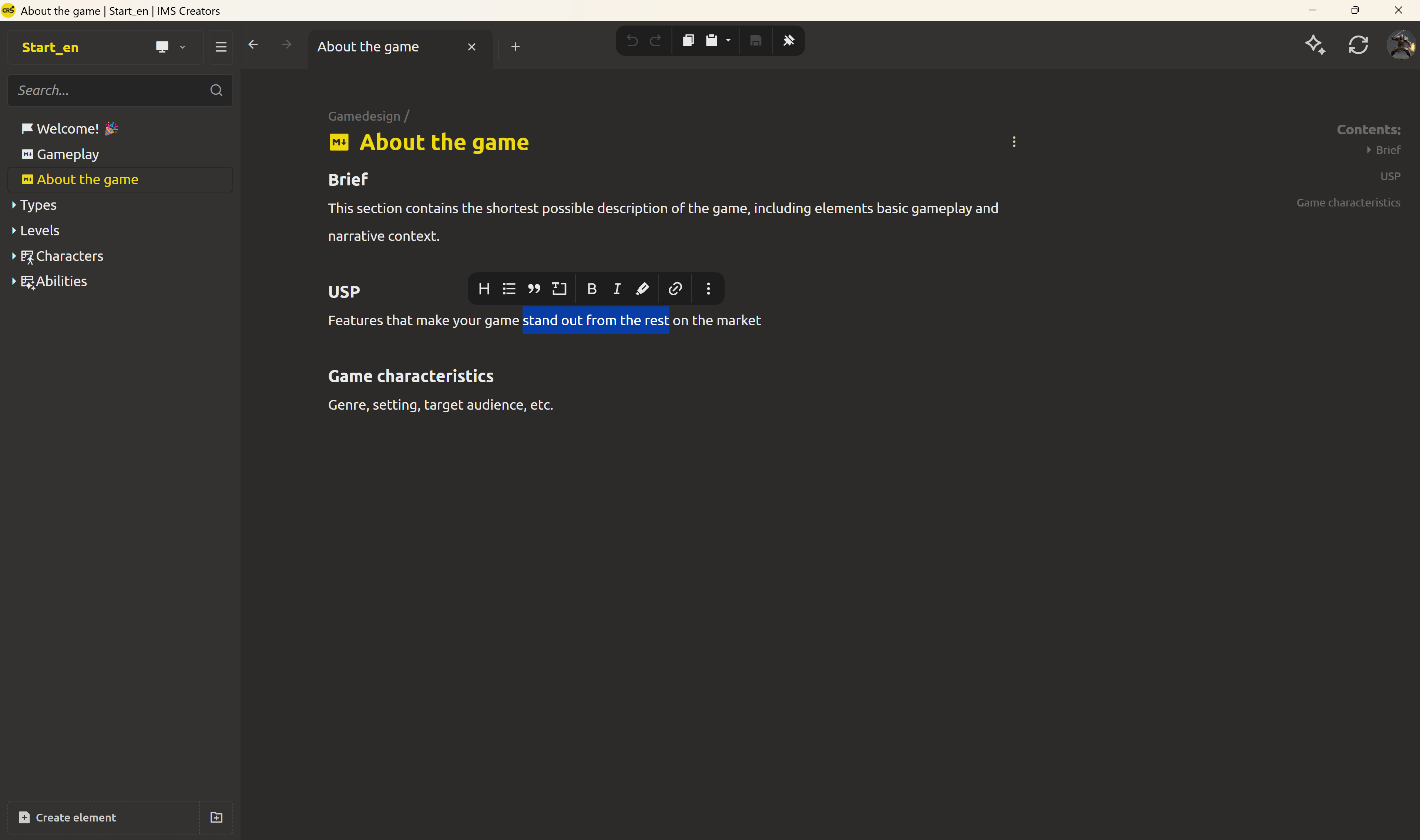
You can work with whatever is closer and more convenient to you. Create your first project element and it immediately becomes part of the structure.
Create the "About the game" element
Let's build the first page of your project - the game concept.
Step 1: Clear the starter template
If you created your project with a starter template (as we did yesterday), it already has example elements like About the game.md, Gameplay.md, and folders for Characters/, Abilities/, and Levels/. To start clean, delete all elements from the template - leave just an empty project.
Step 2: Click "Create element"
In the left panel (or the top toolbar) find the Create element button. Click it.
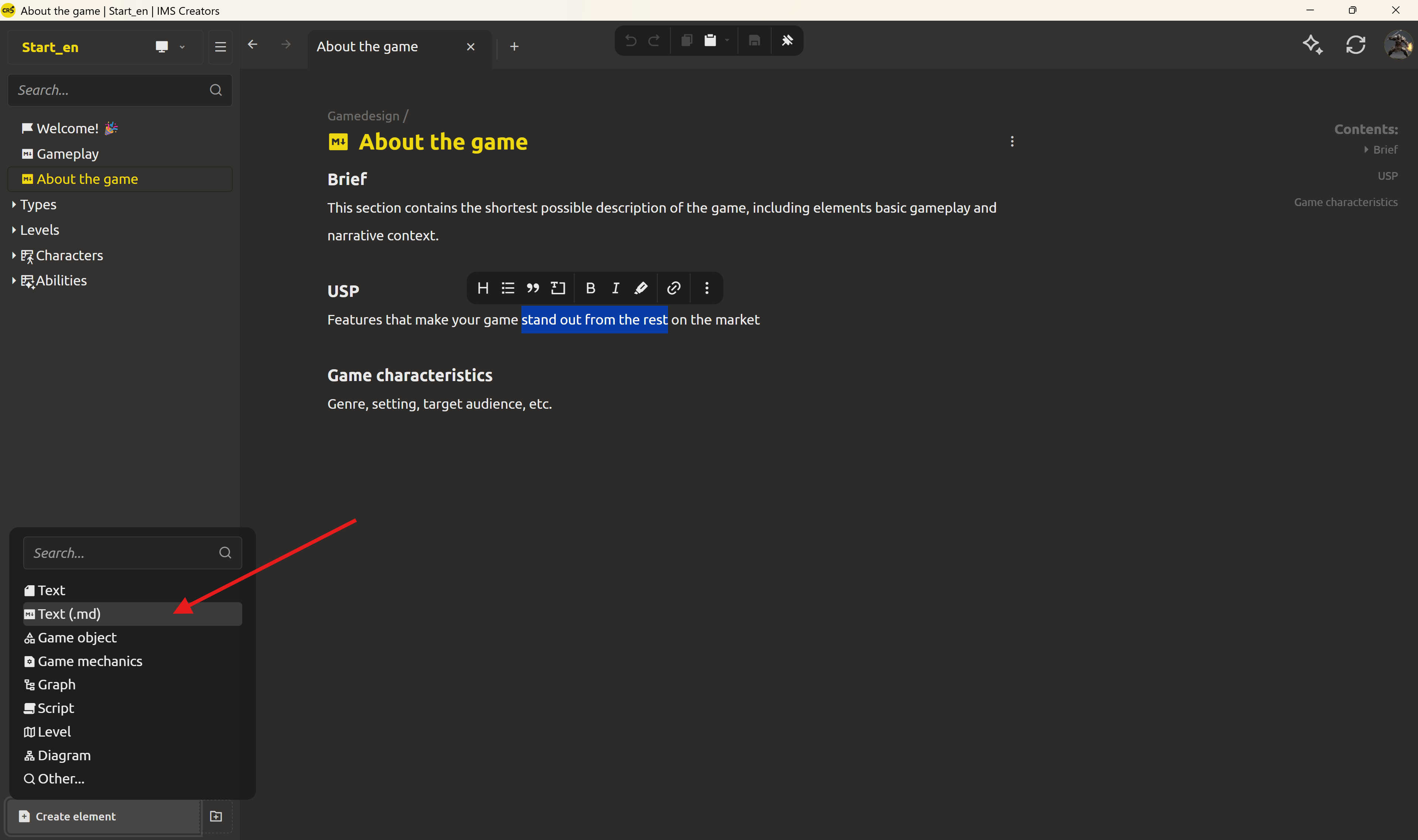
Step 3: Choose the type "Text (.md)"
In the type selection menu, choose Text (.md) - the Markdown element, exactly what a game concept needs.
Step 4: Name the element "About the game"
IMS Creators will show a name prompt. Type About the game - this becomes the file name and the element title.
Step 5: Write your game concept
- To capture the basic idea, use this framework (High-level, Product, and System Designs) to clearly articulate the concept, target audience, and main game cycles.
- Remember that this is only the foundation: as the project grows, do not inflate this file, but develop the idea further by creating separate detailed documents for specific parts (mechanics, plot, dialogues, etc.).
- When the concept is approved and deep details are needed, familiarize yourself with this template for a full GDD: link to the GDB template on GitHub.
Step 6: Save
IMS Creators saves automatically. Your first element is ready.
What's next: your first character
You have the concept. You know what the game is, what the fantasy is, what the pitch is. Now it's time to create your first character - a game entity with structured fields, not a paragraph of text.
In tomorrow's post we'll create the first GameObject - an element with fields (health, stamina, role) - and see why structure beats prose.
Ready? Turn your character into a structured game object - the next post in this series.
FAQ
Can't I just write in Google Docs or Notion?
You can. But Google Docs doesn't link documents together. Notion doesn't give you files on disk. IMS Creators gives you both: structured elements with relationships - and plain files you control. Your concept isn't a "document in the cloud." It's a file on your disk, part of a structured project.
What is an "element" in IMS Creators?
An element is any object you create in the project. A document, a character, an enemy, a weapon - they're all elements. Different element types have different fields and capabilities. A Markdown element is a text document.
Do I need to know Markdown?
No. The Text (.md) element opens in a visual editor - you see formatted text and edit it like a normal document. But if you do know Markdown, you can peek at the raw syntax and write it directly. And if you have notes in Notion or another Markdown editor - just copy and paste.
Where is my element stored physically?
In the project folder, as the file About the game.md. It's a plain Markdown text file. You can open it with any editor.
How do I link the concept to other elements?
In the next posts we'll create characters, abilities, and levels - and each will reference the concept. IMS Creators supports links between elements that update automatically on rename.
What if I want to change the concept later?
Just open the element and edit it. IMS Creators saves the changes. Linked elements stay up to date - the link points to the element, not to specific text.