
This tutorial is a part of the Getting started series — Day 5, Week 1.
The problem: design and code drift apart
Yesterday we built an Enemies folder and filled it in - each enemy is a game object with the same fields: health, speed, damage and size. Rebalancing is happening in the app, and everything is fine from the point of view of game design.
The next step is to show all the data to the game engine, otherwise sooner or later another problem will overtake us:
The designer updates Mall walker's speed to 60. The programmer, working according to the old note, works with the value 30. Design and code quietly drift apart, triggering endless debates over critical details. It's a classic sync issue, where you waste hours of actual time just stopping and asking, "Wait, which one is actually right?"
The fix isn't discipline or more meetings. The solution is different: the engine must pull up the very file that the designer edited. And to do this, the design itself needs to be turned into a format that the engine understands.
IMS Creators can also export data to custom formats shaped for a specific engine, but we'll dig into that later. For now, let's take the simplest, most visual path: place the IMS Creators Desktop project right inside the Godot project's directory. Design and code end up side by side, and the data lands on disk right next to the engine - so the engine doesn't have to look far for what to read.
Why does JSON solve this problem?
The game object is not tightly sewn inside the engine or the editor. On the disk, this is a regular file - for example, Enemies/Mall walker.ima.json. In fact, we are dealing with a clean, structured JSON format. And such open JSON is the fastest and most direct bridge between design and code:
- It's a plain text format any program can read - no proprietary export, no lock-in.
- It's structured - numbers stay numbers, with the same field names the designer typed (
health,speed,damage,size), not prose to be parsed. - It updates the moment you save - edit in IMS Creators, and the same
.ima.jsonthe engine loads changes with you.
One file, two consumers: the designer edits it in the app, the engine reads it at runtime. When the value changes on the design side, the engine picks up the new value on the next load. No more two sources of truth.
Open the project folder and read the field data
Let's look at what's actually on disk. Open your project folder and open Enemies/Mall walker.ima.json in any text editor. It's a JSON document with a little bookkeeping at the top - an id, some blocks, and the element's title. What matters for the engine is the values -> props section, which holds exactly the fields you typed:
{
  "title": "Mall walker",
  "values": {
    "props": {
      "damage": 8,
      "speed": 30,
      "health": 60,
      "size": 1
    }
  }
}
That's all - the same fields you set in the app live in a simple, readable file. The designer doesn't need to re-type them for the engine, and the engine doesn't need to guess them from a paragraph. This was the point at which our previous stage of development led: structured fields become data, and data is something code can load as-is.
Load that same file in Godot
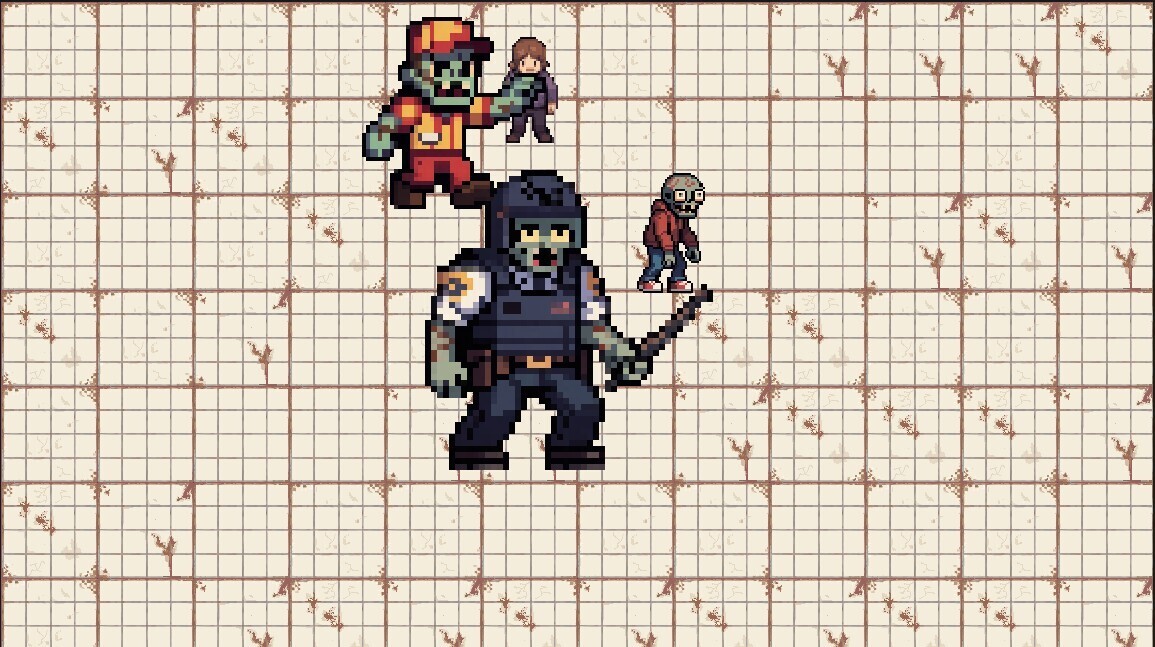
Now the engine side - we'll use the real Godot project ("Dead Mall") as our example: a scene with Chloe and three enemies (Mall walker, Mall Walker (Armored), Food-court runner) chasing her. Every enemy instance has an exported data_path pointing right at its .ima.json, and an enemy script reads speed and size back into the scene:
@export_file("*.json") var data_path: String

func _reload():
    var file = FileAccess.open(data_path, FileAccess.READ)
    var json_text = file.get_as_text()
    file.close()

    var json = JSON.new()
    json.parse(json_text)

    var props: Dictionary = json.data.get("values", {}).get("props", {})
    speed = props.speed
    scale = Vector2(props.size, props.size)

func _ready():
    _reload()
Godot now sees speed = 30 and size = 1 for a Mall walker - the same numbers the game designer set in the app. The enemies chase Chloe, so the numbers are visible live: bump Speed or Size in IMS Creators, save, and reload the scene, and the enemy really does run faster or loom bigger.
The payoff: one source of truth
This is what we've been striving for all week. Your bestiary is no longer a document that "informs" the developer, who in turn keeps everything in mind - it is a file that is used in the game code:
- No transcription. Nobody retypes
speedor re-extracts it from a sentence. The engine reads the field directly. - No drift. A rebalance in the app is instantly true on disk, so the engine can't be showing stale numbers.
- Git-friendly. Because
.ima.jsonis plain text, every balance change is a clean diff you can review and roll back.
Disparate notes became an enemies folder, the folder became simple files, simple files became data that the engine loads. The whole cycle from "ideas in the designer's head" to "numbers in the game" is now one folder that can be opened.
Next up: link characters to abilities
The next step is to link the characters to their abilities through links so that renaming one doesn't break the other. The design ceases to be isolated files and becomes a network of connected elements - and then we will continue to ensure that this network and the code are synchronized.
Ready to see your own numbers in a running game? Download IMS Creators, open your project's folder on disk (the real project puts it in an Enemies folder), read one .ima.json in a text editor, and load the same fields into Godot today: ims.cr5.space/desktop.
Ready? Give your fields real types - the next post in this series.
FAQ
What exactly is in an .ima.json file?
It's a plain JSON document for one element. Along with some bookkeeping (an id and blocks), it contains the element's title and, under values -> props, the structured fields you entered - like health, speed, damage and size. Everything is standard JSON you can open in any editor and game-engine.
Do I need to export anything before the engine can read it?
No. The .ima.json file is already on disk as plain JSON the moment you save the element. Reading it involves no export step - your engine can load the file directly. A one-click export feature is a later topic in the series.
What if my engine expects a different structure than values.props?
That's fine. The file is plain JSON, so you parse it however your pipeline needs: the recipe above reads values.props, but you can map the same file to whatever shape your engine wants with a few lines of code. And if you'd rather skip the parsing entirely, IMS Creators lets you configure the export format for a specific engine right in the app - so the data can arrive already in the structure you need.
Is this a replacement for proper version control?
It complements it. Because the files are plain text, you can commit them to git and diff every change. Version control is your safety net; the open JSON is what keeps design and runtime code in agreement in the first place.
Will IMS Creators overwrite my file if I edit it outside the app?
No - it's the data on disk that is the source of truth, so IMS Creators will pick up changes you make to the file externally. Still, editing in IMS Creators is far more comfortable: it understands the element's structure and makes changes carefully, without risking accidentally breaking the bookkeeping fields.