
This tutorial is a part of the Getting started series — Day 2, Week 2.
The problem: duplicate fields in every element
Yesterday you put the fields in order and set strict types, so now all the values in your project are clear and predictable. Great base!
The next step is to optimize your routine. Every time you create another enemy, you have to re-describe the same properties - health, speed, damage, size. When you create another character, the health and stamina fields come back. Another card, another name and cost typed from scratch. While there are only three or four elements, it's just boring. But when the bestiary grows to thirty positions and the deck to fifty cards, you'll spend a lot of time routinely copying the structure instead of doing game design. It's hard to imagine how long it will take if you decide to add a new property and it needs to be declared on every existing element.
The solution is to stop defining the schema for each element and define it once, for all.
What is the base object?
In IMS Creators, this job is solved by the base object. A base object is a regular game object that you mark as a template. It carries a field schema - a list of fields and their types that each member of the category should have - and, like any object, it can also hold values. Those values become the default for every instance you create, so a new enemy gets your typical base stats filled in for you. From any game object you can create an instance of it - a new game object that inherits the same field schema and is ready for you to fill in the values.
Marking an element as a template is optional. Even without the flag, you can still create instances of any game object. A normal template lives in the project tree just like any other object - you navigate to it, right-click, and create an instance. (There's also a dedicated internal Base objects section, but that's for the app's root templates, not the ones you mark yourself.) The real role of the flag is to keep the template itself out of progress tracking: in the cloud version, a template element is not shown in the to-do list, because the categories aren't content to ship - they're the structure for content. So mark the category's defining element as a template to keep your progress list focused on actual content.
The connection is simple: the base object defines what each member has. The instance defines what exactly this particular member is.
- Base object (template): defines the schema of fields - names, types, default values. It may carry values, which become the defaults for its instances.
- Instance: inherits the schema from the base object and fills in specific values for one specific element.
The app also ships its own root base objects - templates it uses internally for shared, cross-cutting concepts. For example, root base objects can define reusable things like dialogue triggers and variables that apply across all dialogues. We'll cover those in a future tutorial.
Game Object → Enemy → Concrete enemy
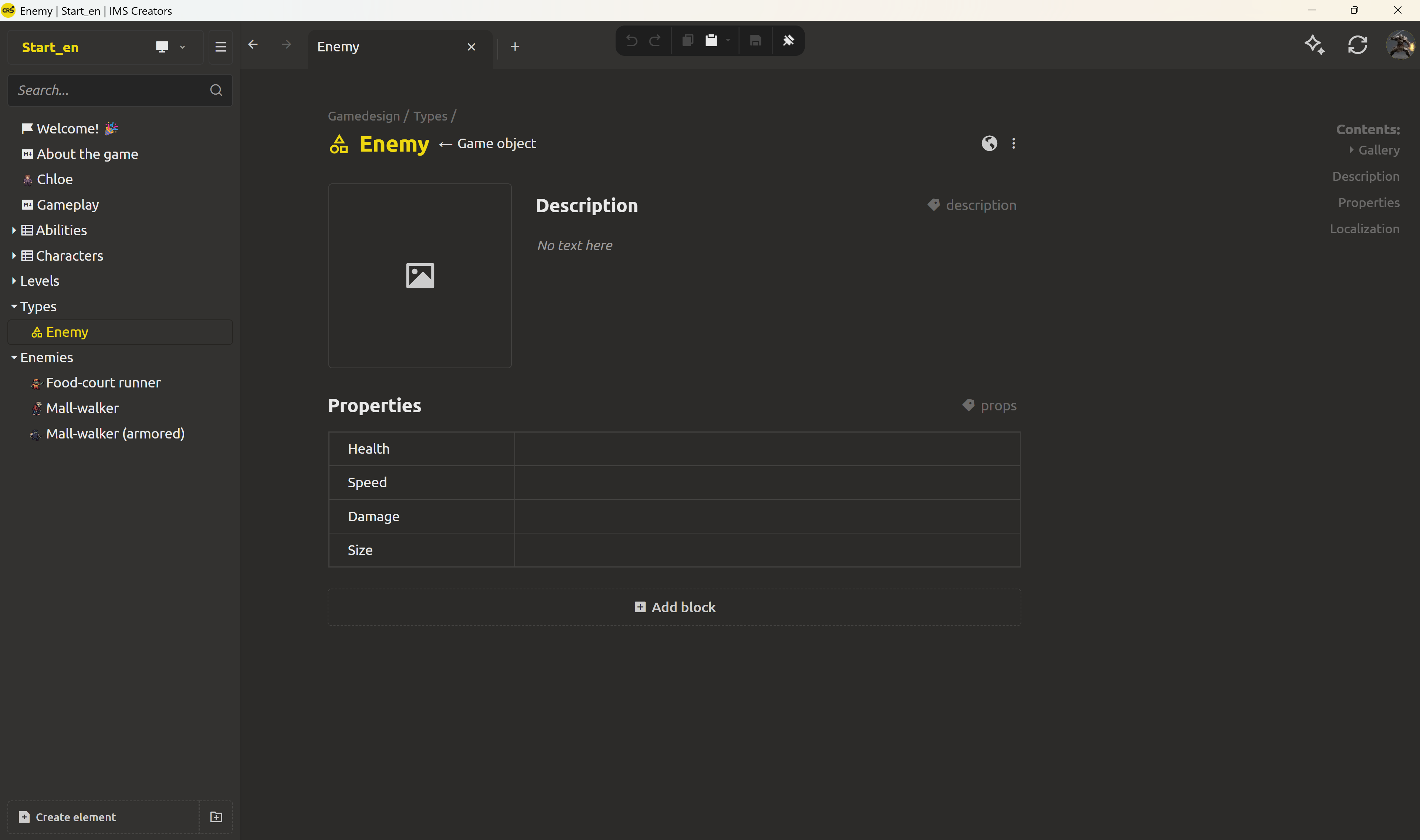
The enemies from last week - Mall-walker, Mall Walker (Armored) - are concrete entries with values already filled in. Let's define a new element that will hold the common schema, and place it in a separate Types folder - so the base object doesn't get mixed into the bestiary.
In the Properties block of this new element, add the fields that every enemy should have:
- Health - Integer number
- Speed - Number
- Damage - Number
- Size - Number
Leave the values empty. This will be the list of fields for every element of the "Enemy" category.
Let's mark this element as a template. Click the three dots in the right part of the asset header and toggle Is template. Marking it is optional - inheritance works without it too: instances of a base object receive its fields either way. However, besides the semantic meaning, the flag has a practical use when tracking the progress of your work: in the cloud version, a marked template stays out of the to-do list.
Now right-click the template and select Create Instance. IMS Creators creates a new game object with four already-defined fields - Health, Speed, Damage, Size. Name him Bruiser and fill in: Health = 200, Speed = 15, Damage = 15, Size = 3. A heavy, slow enemy, ready.
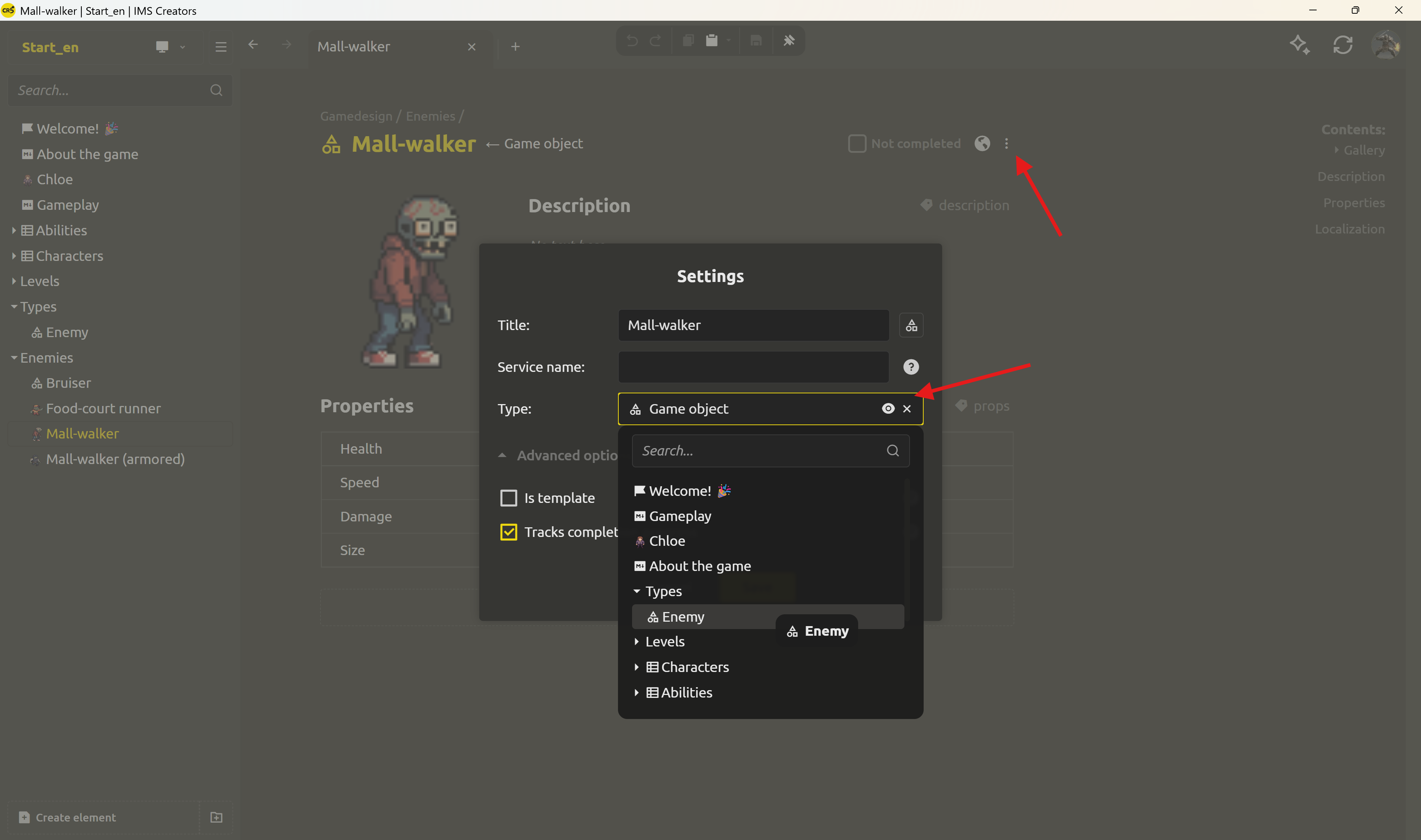
What about the enemies that already exist? You don't need to recreate them. Open the enemy's settings from the three dots in the right part of the asset header and find the Type field - it tells the asset what it inherits from. Choose the enemy base object you just created, and the current object immediately becomes an Enemy instance: the shared fields appear, and it keeps updating along with the category. All the values you've already entered are preserved - you only change the schema, the existing data isn't lost.
Game Object → Character → Concrete character
The same pattern for your roster. Create a base object for a character, mark it as a template, and give it the fields every character shares:
- Health - Integer number (a whole number of hit points)
- Stamina - Number (how much effort is left before slowing down)
- Role - String (for now a single line of text - a fixed-list vocabulary arrives later this week)
Create an instance and name it Dmitri. The fields appear on their own right away - all you have to do is fill in the values: Health = 120, Stamina = 30, Role = "Scout". And Chloe, who has been in the project since Week 1, can join the Character category without a recreate: point her Type at the Character base object in her settings.
Game Object → Game Card → Concrete card
The deck is the new piece of the structure of the game. In Week 1 the game's items and abilities were scattered ideas; this week they become game cards - the set of cards your characters actually play and drop. Every card, whatever it is, shares the same core fields:
- Name - String
- Cost - Integer number (energy to play the card)
- Damage - Number (the hit the card deals)
- IsLegendary - Checkbox (rarity)
Mark a base object as the template, then create instances of it. The legendary Fire Extinguisher card: Name = Fire Extinguisher, Cost = 6, Damage = 4, IsLegendary = true. The starter Banana Peel: Cost = 1, Damage = 1, IsLegendary = false. Two cards, one schema, zero re-typing of field names.
If in the future every card should have a Description field, you add it once to the base. Each existing and future instance automatically receives the new field, and the change propagates instantly - this is what makes the shared schema worth the setup.
Result: configured once, use it constantly
A base object defines what every enemy has, what every character has, what every card has. An instance is just one concrete version of that shape.
Practical benefit: adding the next enemy, the next character, the next card - filling out the finished form. If something needs to change, you edit it once in the base object, and each instance changes with it.
Next: let's learn how to connect cards and characters.
The templates have defined the category structure, but cards and characters are still separate lists. Tomorrow an important difference arrives: cards will come in two kinds - items, which any character can use, and abilities, which belong to a concrete character. We'll reflect this difference in the game design with one more level of inheritance, and add links from each ability card to its owner.
Are you ready to get rid of the routine when working with data? Download IMS Creators, open ims.cr5.space/desktop, mark one game object as a template, and create your first instance. A few minutes of base-object setup is what makes adding the next element take two minutes instead of ten.
Ready? Link characters to abilities so renames never break - the next post in this series.
FAQ
What is a base object in IMS Creators?
A base object is a regular game object that is used to produce new objects. It defines a field schema - names and types - and any values it holds become the defaults for its instances. New game objects created from the base inherit its fields automatically.
How do I mark a game object as a base object (template)?
Open the game object, click the three dots in the right part of the asset header, and toggle Is template to on. A normal template stays in the project tree like any other object. (The dedicated Base objects section is for the app's internal root templates, not the ones you mark yourself.) The flag's main role is to keep the category definition out of progress tracking - in the cloud version it won't show in the to-do list, leaving that list for actual content. You can still create instances either way.
How do I create an instance of a base object?
Right-click the base object (or any game object, template or not) and choose Create instance. A new game object appears with the same field schema inherited from the base, ready for you to fill in values. Marking it as a template isn't required - it only keeps the element out of progress tracking.
Can I turn an existing element into an instance?
Yes. Open the element's settings from the three dots in the right part of the asset header, find the Type field, and point it at the base object. The element inherits the shared schema from that moment and behaves like any other instance - without being recreated.
Can I still add custom fields to one instance?
Yes. Instances inherit the base's schema, but you can add extra fields to a specific instance without affecting the others. The base defines the shared shape; instances can extend it.
Is this the same as duplicating an element?
No. Duplicating copies the element with its current values. Creating an instance inherits the field schema from a base object - you get the same structure but start with the defaults to fill in. The instance stays linked to its base, so schema changes propagate.
Where do base objects live in the project?
Normal templates are regular game object files on disk and stay in the project tree like any other object - marked as templates internally (isAbstract: true in the JSON). There is also a dedicated Base objects section in the app (visible in Settings), but that's for the internal root templates the app itself provides, not the ones you mark.