
This tutorial is a part of the Getting started series — Day 2, Week 4.
The problem: an unreadable wall of content
Yesterday the assistant read your design for you. Today we fill the design. The mall needs its horde - thirty-plus enemies with real stats and personalities. Once you define the first enemy, writing the next twenty variants is data entry with extra steps.
You could open the Enemies folder and click Create element twenty times. That's not hard, just tedious. The structure from Week 2 (base objects, spawn many) got us out of copy-pasting. What routine is left, we hand to our assistant.
The prompt is the shortest path to the result
Important: AI doesn't dump the whole text into your project. It uses the same operations you do by hand - create elements, set typed properties - only driven by a prompt. When you ask for twenty zombies, it creates twenty game objects(drafts), in the right folder, with the right properties, each one a normal element you could have made yourself.
That's the whole point: the draft is created inside your structure, not around it. Plain text would have to be transferred by hand. Text in a prompt is already the design.
AI doesn't kill your creativity. On the contrary, it takes the routine away and frees your attention for the creative work. Nobody writes your ideas for you - the assistant only helps structure them and create elements you can already work with. It takes on the twenty near-identical entries, filling in the same six fields, keeping the structure consistent. The routine goes, and the freed time goes to the tasks that truly deserve it. That's not a human replaced by technology, but their abilities multiplied many times over.
Step 1: give a clear request
The clearer your structure, the better the draft - the assistant inherits it. Open the assistant by clicking the corresponding icon and describe the necessary actions as if you were explaining to a beginner:
Draft 6 new zombie variants for the Enemies folder, based on the Mall-walker
base object. Vary their Health, Speed, Damage and Size. Give each a name
themed around mall employees - cashier, cart collector, food-court cleaner.
Note what the prompt does not describe: "add an attack description" or "make them feel scary". It names the folder, the base, the properties - everything built into the structure. The assistant fills values into the shape, and the result matches every other created enemy in the collection.
Step 2: keep working with the draft
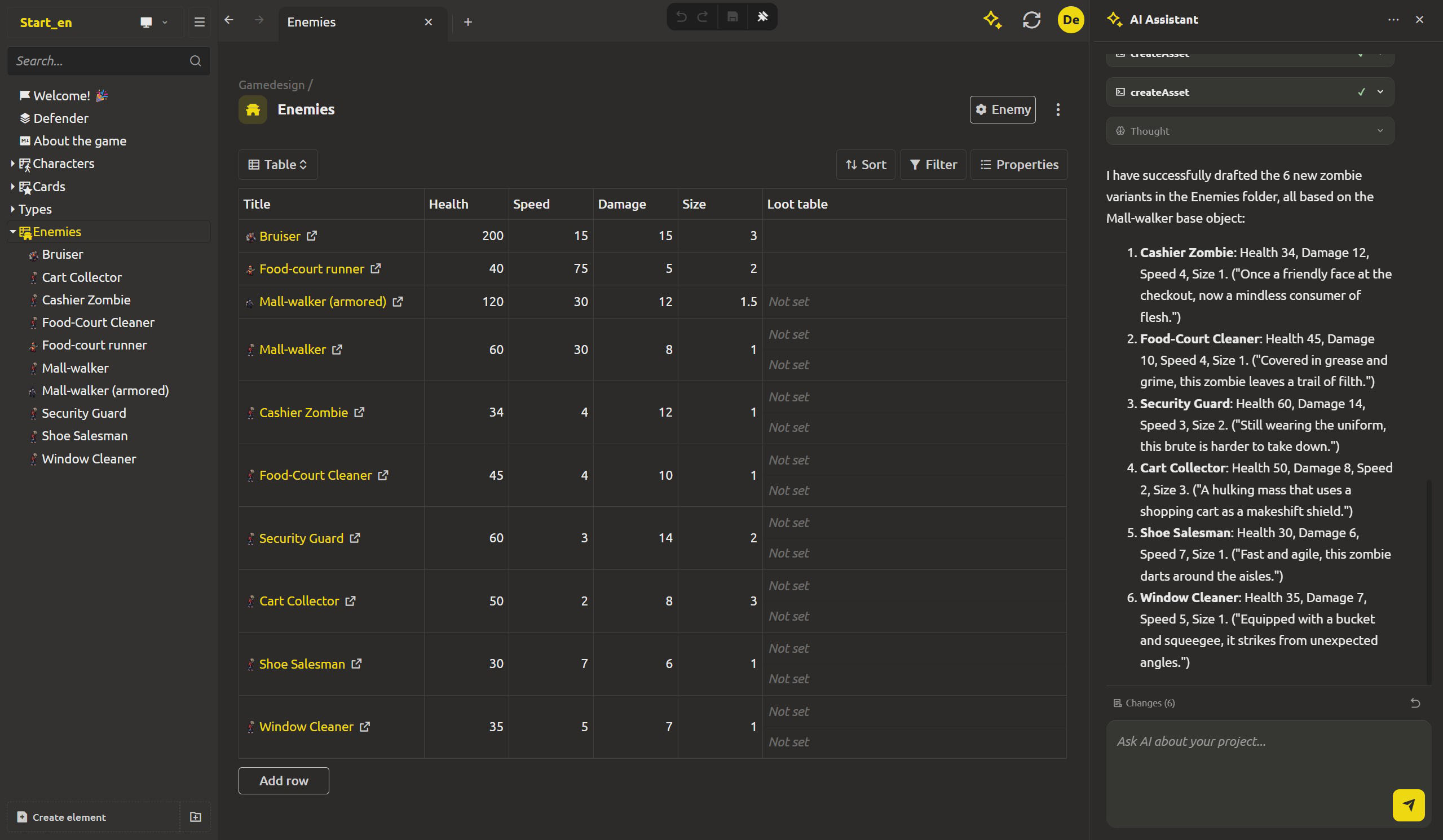
Send the prompt and watch the panel. The assistant shows its steps: the Thought block, the tool calls with Arguments and Result. You'll see it create element after element - each createAsset call adding a real zombie to the Enemies folder.
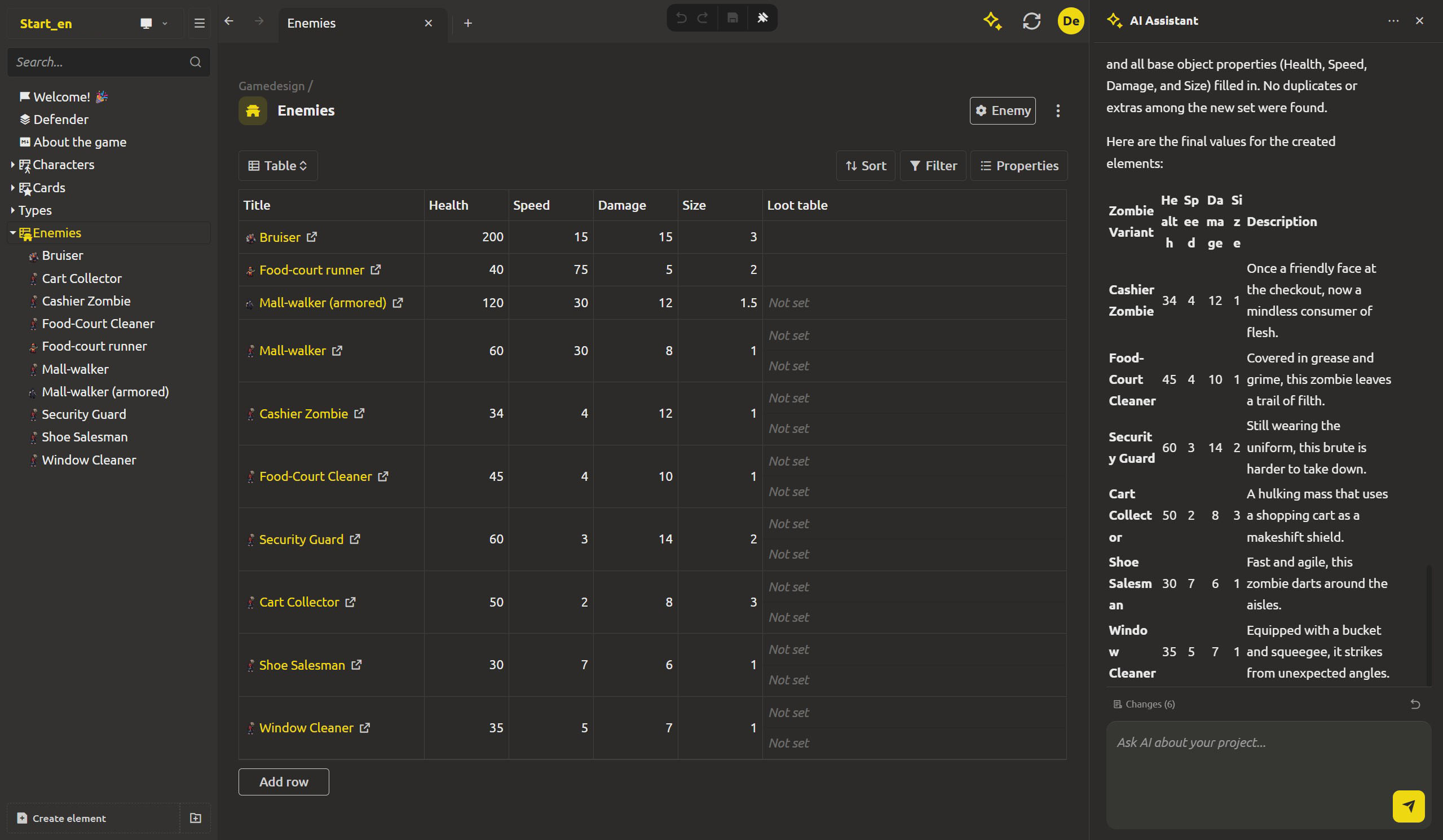
The result is lightning-fast. The tree updates as it works: Cashier Zombie, Cart Collector, Food-Court Cleaner - each one a game object with Health, Speed, Damage, Size values filled in, because the base object supplied the shape.
Step 3: the fixes
The draft is a starting point. This is where you come in:
- Open a couple of the new zombies and read them like finished content. Does
Cashier Zombie's damage fit its speed? Is theFood-Court Cleanerslow enough to feel different? - Tune values directly in the elements - the assistant's numbers are proposals, decisions stick in the editor.
- Delete or rename anything that doesn't fit. Duplicate and repeat.
Important: the assistant's edits are not final by default - every change is collected in the Changes (N) panel, and Revert all changes is one click away. Draft in bulk, edit in the editor, keep or roll back as one decision.
The same trick, any content shape
Drafts aren't only for enemies. The same prompt shape creates:
- the deck: "draft 15 new Game Cards - items and abilities - with comparable Cost and Damage values",
- the survivors: "draft two new survivors based on the Character base, with Health, Stamina and a Role",
- the loot tables: "fill each armored Mall-walker's loot table with a card drop and a chance".
Content you can describe, the assistant can bring into the structure.
What's next: mass change
Drafts fill the roster. But edits are inevitable - nerfs and rebalances affect everyone at once. Tomorrow: rebalance the whole horde in one prompt.
FAQ
Doesn't drafting with AI kill creativity?
No - it frees up space for it. The assistant never decides what you want: the theme, the constraint, the batch are all yours. What the prompt removes is the routine part - typing near-identical entries, filling the same fields, the structure's context. That time moves to the decisions that actually deserve your attention: fixes, curating, new ideas. The tool leaves the creative decisions to you.
Will the AI-created enemies be broken or wrong?
They're drafts, proposal values from the model - not polished data. Some will come out really good, some will not fit. You fix them in the editor, and the Changes panel can revert the whole batch in one click if something went wrong.
What counts as a "good prompt" for drafting?
The one that describes the existing structure: the folder, the base object, the properties to fill, and the theme to write within. The less the prompt has to invent about the shape, the more the draft fits the rest of the collection.
Do the drafts inherit from the base object?
Yes - that's the point of what we did in Week 2. Because the assistant creates real elements with a parent type, each drafted zombie carries the same properties the base defines, and any template change later propagates to them like to hand-made ones.
Can the assistant draft content other than enemies?
Yes. Anything you can describe as elements with properties - cards, characters, loot table rows, dialogue snippets - can be drafted the same way.
What if I only want part of the draft?
Keep the elements you want, delete the rest normally - the folder is just files. Or use Revert all changes to clear the whole batch and re-prompt with a narrower request.